User guide › Load your herd
Load your whole herd at once
Already have your animals on a spreadsheet or in your records? Instead of adding them one by one, you can load them all into KraalBook in one go. It takes a bit of care with the spreadsheet, so please read these steps — they'll save you a lot of frustration.
Best done on a computer. Opens in Excel or Google Sheets.
⚠️ Read this first — Excel can quietly break your data
Spreadsheets like to “tidy up” what you type, and it causes two problems that make imports fail: long ID numbers get shortened (and the real digits are lost), and dates get reformatted. Step 2 below shows you how to stop this before you start typing. Two minutes there saves a lot of redoing.
Step 1 Download the template (on a computer)
Click “Download herd template (CSV)” above. It downloads a file called
kraalbook-herd-import-template.csv. Open it in Excel or Google Sheets.
The first row is the column headings. The next few rows are filled-in examples to show you the format — delete those example rows before you add your own animals (or leave them; they're valid).
Step 2 Stop Excel breaking your numbers & dates
Do this before you start typing — it's the number-one cause of frustration.
⚠️ ID numbers (the eid_tag column)
A 15-digit electronic tag like 982000123456789 gets turned by Excel into
9.82E+14, and the real digits are lost — they can't be recovered. To prevent this:
- In Excel: click the letter above the
eid_tagcolumn to select the whole column → right-click → Format Cells → choose “Text” → OK. Now type or paste your tag numbers. They should stay as full numbers, lined up on the left of the cell. If a cell shows9.82E+14or9,82E+14, it's broken — delete it and type it again (with the column set to Text). - In Google Sheets: select the
eid_tagcolumn → Format → Number → “Plain text”, then enter the numbers. - No electronic tags? You can leave
eid_tagblank — it's optional (see the column guide).
⚠️ Dates (the date_of_birth column)
Use the format YYYY-MM-DD, e.g. 2022-03-15 (year-month-day). Excel may
re-display it as 2022/03/15 or 15/03/2022 — the app understands those too, but if
you ever get a date error, set that column to Text (as above) and type the date as
2022-03-15.
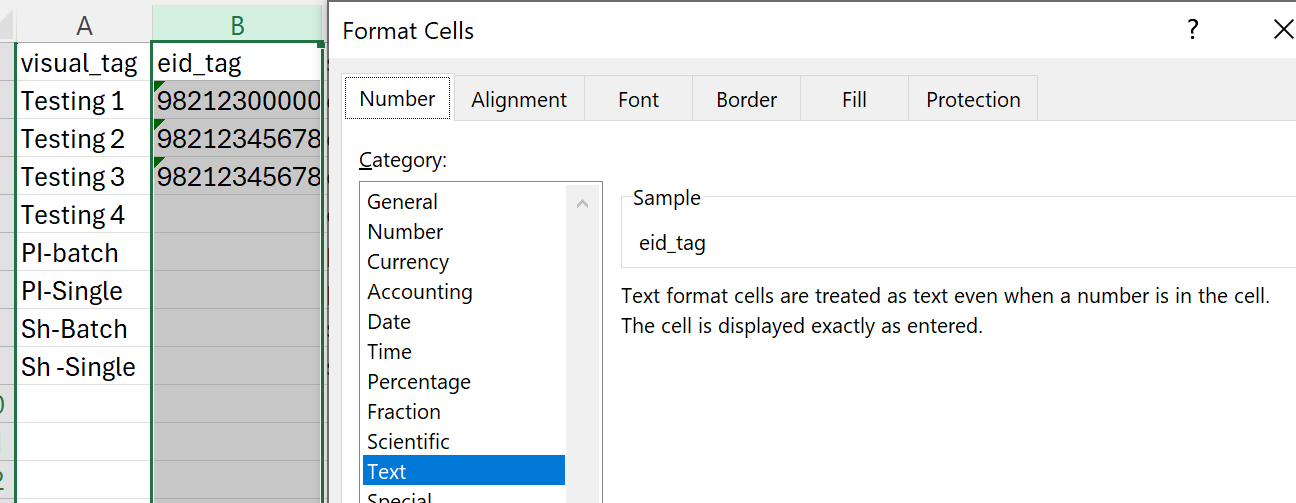
eid_tag column to Text before typing, so long tag numbers aren't shortened.General spreadsheet rules
- Keep one row per animal (or per batch).
- Don't rename, reorder, add or remove the heading columns, and don't delete the first (heading) row.
- When you save, choose “CSV (Comma delimited)” / “CSV UTF-8”. (Not .xlsx, not “CSV for Macintosh”.)
Step 3 Fill in your animals (column guide)
For every animal you must fill in: a tag (visual_tag
or eid_tag), the species, and the sex. Everything else
is optional but useful.
Fill in the spreadsheet in English
The column guide below is in English — and so is the spreadsheet. Keep the column headings exactly as they are, and enter the species and sex in English (cattle, sheep, goat, pig; M, F). Your own words — breed, colour and camp names — you can write in your own language.
| Column | What to put |
|---|---|
visual_tag | The ear-tag/number you read by eye (up to 10 characters). Fill this in OR eid_tag. |
eid_tag | The 15-digit electronic (RFID) number, starts with 982. Optional. ⚠️ Format the column as Text first (Step 2), or leave blank. |
species | One of: cattle, sheep, goat, pig. |
sex | M (male), F (female), or X (mixed — only for a batch). |
kind | individual or batch. Leave blank for a single animal (defaults to individual). |
head_count | How many animals this row is. 1 for an individual; the number in a batch. |
breed | e.g. Bonsmara, Dorper. Optional. |
date_of_birth | YYYY-MM-DD, e.g. 2022-03-15. Optional. Must be a real, past date. |
colour | e.g. Brown, White. Optional. |
cattle_category | Cattle only: heifer, cow, bull, ox, steer, or calf. |
location_name | The camp/location name. If it doesn't match a camp you've made in the app, the animal still loads — just without a camp — and the app tells you so you can fix it. |
mother_tag | To record a calf against its mother, put the mother's tag here (her visual_tag or eid_tag). The mother can be another row in this file or an animal already in your herd. Want 5 calves on one cow? Give each of the 5 calf rows the same mother_tag. (Individual animals only.) |
Example rows (already in the template)
The order matches the headings: visual_tag, eid_tag, species, sex, kind, head_count, breed, date_of_birth, colour, cattle_category, location_name, mother_tag.
CA123,,cattle,F,individual,1,Bonsmara,2020-03-15,Brown,cow,South Camp,
CALF55,,cattle,M,individual,1,Bonsmara,2025-09-01,Brown,calf,South Camp,CA123
EWE7,,sheep,F,individual,1,Dorper,,White,,West Camp,
PIGLOT1,,pig,X,batch,30,Large White,,,,Pig House,
Notice the second row (CALF55) has CA123 in its last column — that links the calf to its mother in the first row.
Step 4 Get the file onto your phone
Soon you'll be able to upload your filled-in spreadsheet straight from this computer — no need to move the file to your phone. For now, get the file onto your phone and import it in the KraalBook app (Settings → Import herd).
Send the saved CSV to your phone — keep it as a .csv:
- WhatsApp: attach (📎) → Document (not as a photo) → send to yourself.
- iPhone: open it in WhatsApp → Share → Save to Files.
- Android: tap it in WhatsApp to download (Downloads / WhatsApp Documents).
- Email: email it to yourself, then open the attachment on the phone.
- iCloud Drive / Google Drive: drop it in your drive on the computer — the app reads it from there.
Step 5 Import it in the app
- Open KraalBook → Settings → Import herd.
- Tap “Choose CSV file” and pick the file you saved.
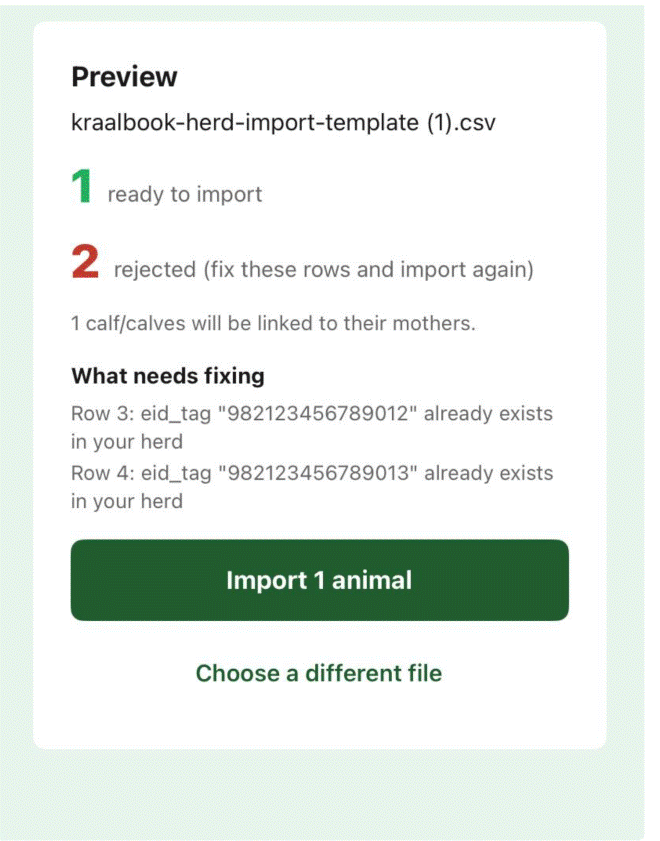
- The app shows a preview: how many animals are ready, how many were rejected (with the reason for each), any camps it doesn't recognise, and how many calves will be linked to their mothers.
- Tap “Import [number] animals”.
If some rows were rejected, fix just those rows in your spreadsheet and import again — animals that already loaded are skipped automatically, so you can't create duplicates.
Troubleshooting
If a row is rejected, the app tells you why. Here's what the common messages mean and how to fix them:
“eid_tag … looks scrambled by Excel”
9.82E+14) and the digits are lost.
Format the eid_tag column as Text and type it again, or leave it blank if the
animal has a visual tag.“date_of_birth … isn't a date we recognise”
2022-03-15). Set the column to
Text if Excel keeps changing it.“At least one of visual_tag or eid_tag is required”
visual_tag, an eid_tag, or both.“visual_tag too long”
“already exists in your herd”
“The file is missing required columns”
“mother_tag … not found”
Adding just a few animals? You can also add them one at a time in the app.
See how to add animals